
With PlayShorts, you can show a different design for your videos depending on the device your visitors are using:
Desktop
Mobile
All devices
This allows you to optimize the viewing experience for each device.
Step 1: Create Your Video Project
Before customizing the design, you need to create your video project.
Follow the project creation guide to get started. Once your project is ready, you can start editing the design.
Step 2: Change the Design by Device
Open your project
Go to Design
The go to Multi-device settings
Choose the device for which you want to customize the design:
All – applies the design to all devices
Desktop – applies the design only on desktops
Mobile – applies the design only on mobile devices
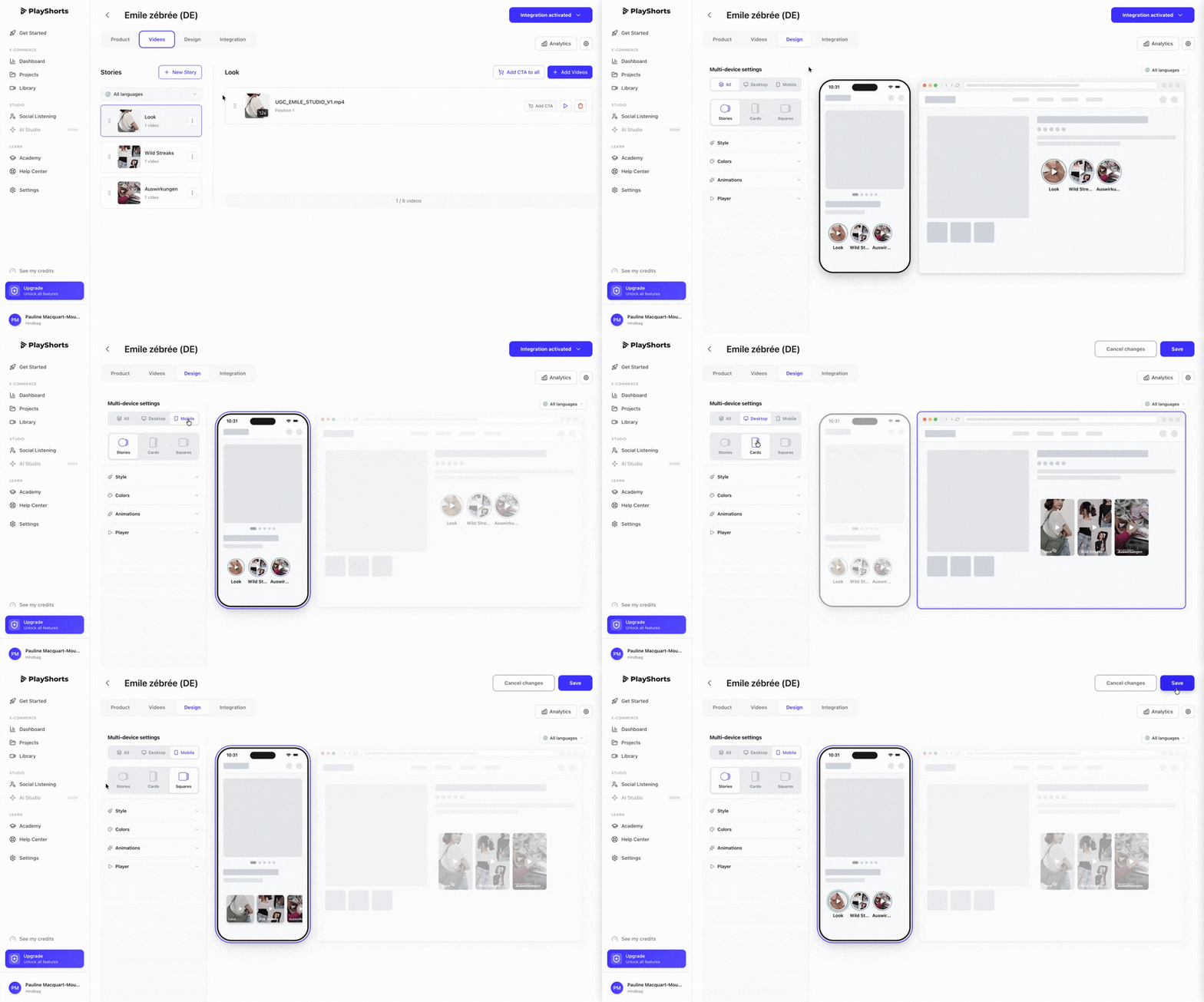
When you select a device, you can set a design specifically for that device without affecting the others.
Example:
Desktop: cards video layout
Mobile: stories video layout
Step 3: Save Your Changes
Once your design is ready, click Save to apply the changes.
Why Use This Feature?
Improve user experience
Optimize mobile viewing
Adapt your message for each device
Increase engagement